
Introducción general #
El B002 beacon is equipped with a three-axis acceleration sensor that can detect whether it is in motion. It can switch between two different advertising modes ( Periodic Mode y Autonomous Mode) by changing the Accelerometer Threshold value. It also supports detecting and advertising the battery level. In autonomous mode, it can advertise every 24 hours if it is not moved.

Especificaciones del producto #
Tabla 1: Especificaciones del producto
| Protocolo | iBeacon |
| Potencia de RF | 0 dBm por defecto, de -20 a +5 dBm. Potencia de TX |
| Distancia | Máx. 80 m |
| Densidad para seguimiento en interiores | >10 m |
| Radiodifusión | Mínimo 100 ms |
| Acelerómetro | Opcional |
| Consumo de energía | Con sensor de aceleración: 5 μA a intervalos de 5 s y 0 dBm. Potencia de TX |
| Sin sensor de aceleración: 4,2 μA a intervalos de 5 s y 0 dBm. Potencia de TX | |
| Batería | Li-MnO2, 500mAh |
| Peso | 10 g |
| Dimensión | 90mm*60mm*1.5mm, Thickness: 1.5~2.5mm.68mm*60mm*2mm, Thickness: 1.5~3.5mm. |
| Proceso de dar un título | FCCID: 2APPL-100-0B, CE |
Descripción de la función #
Estado de encendido/apagado #
- Turn on: Press the button for 3s and the red light flashes for one minute.
- Turn off: Press the button for 3s and no light flashes.

TX Power #
Intensidad de la señal enviada por la baliza. Valor predeterminado: 06 (0 dBm).
Tabla 2: TX Power
| Tipo de valor | Valor | TX Power (dBm) |
| Maleficio | 01 | -20 |
| 02 | -16 | |
| 03 | -12 | |
| 04 | -8 | |
| 05 | -4 | |
| 06 | 0 | |
| 07 | 4 |
Intervalo publicitario #
El intervalo de anuncio de la baliza es de 5 s por defecto, lo que significa que la baliza anuncia el paquete publicitario una vez cada 5 s. El intervalo máximo de anuncio es de 10 s.
Tabla 3: Intervalo de publicidad
| Tipo de valor | Valor | Iintervalo (metros) |
| Maleficio | 01000000 | 100 |
| 02000000 | 200 | |
| 03000000 | 300 | |
| 04000000 | 400 | |
| 05000000 | 500 | |
| …… | …… | |
| 64000000 | 10,000 |
Accelerometer Threshold #
The Accelerometer threshold value is 0x00 by default which means that autonomous mode is disabled and the beacon advertises in the Periodic Mode. When the Accelerometer threshold value is greater than or equal to 0x10, the beacon advertises in the Autonomous Mode. The beacon is considered in motion when the accelerated speed is larger than the threshold. The default unit is 16mg, Accelerometer threshold = value * 16mg.
Table 4: Accelerometer Threshold
| Tipo de valor | Valor | Threshold (mg) |
| Maleficio | 00 | 00 means the periodic mode is enabled. |
| 01 ~ 0F | Reserved for future use. | |
| 10 | 256 (0x10 = 16, 16x16mg = 256mg)Autonomous Mode | |
| 11 | 272(0x11 = 17, 17x16mg = 272mg) | |
| 12 | 288 | |
| 13 | 304 | |
| …… | …… | |
| 7F | 2032 |
Advertise Mode #
Periodic Mode #
In the periodic mode, the beacon advertises the advertising packet at fixed intervals as configured until the battery power runs out.
Autonomous Mode #
In the autonomous mode, the beacon only advertises when it is in motion. When the acceleration is larger than the Accelerometer threshold, the beacon advertises with the Anunciar Interval value for the duration of the Advert Time.
For example, if the interval value is 5s and the advert time is 1min, the beacon will not advertise if it is stationary. When the acceleration is larger than the Accelerometer threshold, the beacon will advertise once every 5s and keep advertising for 1min.
Advert Time #
The duration of the beacon advertisement is 0000 by default, and the maximum advertise time is 65535s. This configuration only works in autonomous mode. If the beacon works in periodic mode, this configuration has no effect.
Table 5: Advert Time
| Tipo de valor | Valor | Time (s) |
| Maleficio | 0000 | Broadcast all the time. |
| 0001 ~ 001D | Reserved for future use. | |
| 001E | 30 | |
| 001F | 31 | |
| 0020 | 32 | |
| …… | …… | |
| FFFF | 65535 |
Configuración del conmutador #
El B002 beacon has two switch functions: “Battery Level Advert” and “No Movement 24h Advert”. The “Battery Level Advert” function determines whether the beacon advertises with the battery level. The “No Movement 24h Advert” function determines whether the beacon advertises every 24 hours if it is not moved.
Table 6: Switch Configuration
| Nnombre | Valor | Ddescripción |
| Anuncio del nivel de batería | 00:disabled, 01:enabled,the default value is 0. | This configuration determines whether the beacon advertises the battery level. |
| No Movement 24h Advert | 00:disabled, 01:enabled,the default value is 0. | This configuration only works in autonomous mode, where the beacon advertises every 24 hours if it is not moved.In periodic mode, this configuration has no effect. |
Función publicitaria #
En Periodic Mode, the beacon advertises a 30-byte packet with a fixed 5s Intervalo publicitario. In Autonomous Mode, the beacon only advertises with the advertise interval value for the duration of the Advert Time when it is in motion and will not advertise when it is stationary.
The beacon advertising packet is as follows.
Paquete publicitario estándar #
La baliza emite un paquete publicitario estándar cuando la función de nivel de batería no está activada.
Table 7. Standard iBeacon Advertising Packet
| Desplazamiento de bytes | Valor predeterminado | Descripción | Propiedades |
| 0 | 0x02 | Longitud de los datos: 2 bytes | Preámbulo constante |
| 1 | 0x01 | Tipo de datos: indicadores | Preámbulo constante |
| 2 | 0x06 | Bandera LE y BR/EDR | Preámbulo constante |
| 3 | 0x1A | Longitud de los datos: 26 bytes | Preámbulo constante |
| 4 | 0xFF | Tipo de datos: datos específicos del fabricante | Preámbulo constante |
| 5 | 0x4C | Datos del fabricante | Preámbulo constante |
| 6 | 0x00 | Datos del fabricante | Preámbulo constante |
| 7 | 0x02 | Datos del fabricante | Preámbulo constante |
| 8 | 0x15 | Datos del fabricante | Preámbulo constante |
| 9 | 0xF2 | Primer byte del UUID de proximidad | UUID de usuario |
| 10 | 0xA5 | Segundo byte del UUID de proximidad | UUID de usuario |
| 11 | 0x2D | Tercer byte del UUID de proximidad | UUID de usuario |
| 12 | 0x43 | UUID de proximidad, cuarto byte | UUID de usuario |
| 13 | 0xE0 | UUID de proximidad, 5.º byte | UUID de usuario |
| 14 | 0xAB | UUID de proximidad, sexto byte | UUID de usuario |
| 15 | 0x48 | UUID de proximidad, séptimo byte | UUID de usuario |
| 16 | 0x9C | UUID de proximidad, octavo byte | UUID de usuario |
| 17 | 0xB6 | UUID de proximidad, noveno byte | UUID de usuario |
| 18 | 0x4C | UUID de proximidad, décimo byte | UUID de usuario |
| 19 | 0x4A | UUID de proximidad, byte 11 | UUID de usuario |
| 20 | 0x83 | UUID de proximidad, byte 12 | UUID de usuario |
| 21 | 0x00 | Decimotercer byte del UUID de proximidad | UUID de usuario |
| 22 | 0x14 | 14.º byte del UUID de proximidad | UUID de usuario |
| 23 | 0x67 | 15º byte del UUID de proximidad | UUID de usuario |
| 24 | 0x20 | 16º byte del UUID de proximidad | UUID de usuario |
| 25 | Automóvil club británico | Primer byte principal | Valor principal |
| 26 | CAMA Y DESAYUNO | Segundo byte principal | Valor principal |
| 27 | CC | Primer byte menor | Valor menor |
| 28 | CC | Segundo byte menor | Valor menor |
| 29 | 0xB3 | Potencia de la señal (SSI calibrada a 1 m) | Valor de potencia de la señal |
Paquete publicitario con nivel de batería #
La baliza también admite la publicación de información sobre el nivel de batería en el último byte. Capítulo 5.2 Configuración del anuncio del nivel de batería Explica cómo habilitar esta función a través de “LightBlue”.
Table 8: Advertising Packet with Battery Level
| Desplazamiento de bytes | Valor predeterminado | Descripción | Propiedades |
| 0 | 0x02 | Longitud de los datos: 2 bytes | Preámbulo constante |
| 1 | 0x01 | Tipo de datos: indicadores | Preámbulo constante |
| 2 | 0x06 | Bandera LE y BR/EDR | Preámbulo constante |
| 3 | 0x1B | Longitud de los datos: 27 bytes | Preámbulo constante |
| 4 | 0xFF | Tipo de datos: datos específicos del fabricante | Preámbulo constante |
| 5 | 0x4C | Datos del fabricante | Preámbulo constante |
| 6 | 0x00 | Datos del fabricante | Preámbulo constante |
| 7 | 0x02 | Datos del fabricante | Preámbulo constante |
| 8 | 0x15 | Datos del fabricante | Preámbulo constante |
| 9 | 0xF2 | Primer byte del UUID de proximidad | UUID de usuario |
| 10 | 0xA5 | Segundo byte del UUID de proximidad | UUID de usuario |
| 11 | 0x2D | Tercer byte del UUID de proximidad | UUID de usuario |
| 12 | 0x43 | UUID de proximidad, cuarto byte | UUID de usuario |
| 13 | 0xE0 | UUID de proximidad, 5.º byte | UUID de usuario |
| 14 | 0xAB | UUID de proximidad, sexto byte | UUID de usuario |
| 15 | 0x48 | UUID de proximidad, séptimo byte | UUID de usuario |
| 16 | 0x9C | UUID de proximidad, octavo byte | UUID de usuario |
| 17 | 0xB6 | UUID de proximidad, noveno byte | UUID de usuario |
| 18 | 0x4C | UUID de proximidad, décimo byte | UUID de usuario |
| 19 | 0x4A | UUID de proximidad, byte 11 | UUID de usuario |
| 20 | 0x83 | UUID de proximidad, byte 12 | UUID de usuario |
| 21 | 0x00 | Decimotercer byte del UUID de proximidad | UUID de usuario |
| 22 | 0x14 | 14.º byte del UUID de proximidad | UUID de usuario |
| 23 | 0x67 | 15º byte del UUID de proximidad | UUID de usuario |
| 24 | 0x20 | 16º byte del UUID de proximidad | UUID de usuario |
| 25 | Automóvil club británico | Primer byte principal | Valor principal |
| 26 | CAMA Y DESAYUNO | Segundo byte principal | Valor principal |
| 27 | CC | Primer byte menor | Valor menor |
| 28 | CC | Segundo byte menor | Valor menor |
| 29 | 0xB3 | Potencia de la señal (SSI calibrada a 1 m) | Valor de potencia de la señal |
| 30 | Nivel de batería | Bnivel de batería | Bnivel de batería |
Configuración de Lansitec BLE Beacon con un iPhone #
Aviso: todos los parámetros están en formato hexadecimal.
Paso 1: Busca y descarga “LightBlue” en la App Store.

Paso 2: Mantenga pulsado el botón para encenderlo. B002 beacon label. A red light flashes in the first minute.
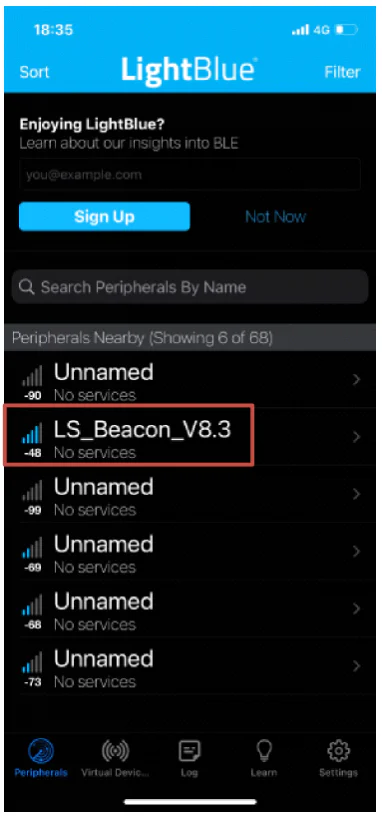
Paso 3: Abierto Azul claro, and click a beacon with the name “LS_Beacon_Vx.x” which will show up in the app. Please click the iBeacon within 1 minute after powering on, or it must be restarted to enter the configuration mode again.
Configuración principal #


- Haz clic en “Especialización” (paso 1).
- Haga clic en “Escribir nuevo valor” (paso 2).
- Enter a new value (step 3) and click “Done” (step 4) to save and click “0xFFF2” (step 5) to return to the “Major” page.
- The new value is shown in the value block (step 6) of the “Major” page, and the previous value is grey. Click the “LS_Beacon_V8.3” (step 7) to return to the previous page.
- Haz clic en “Atrás” (paso 8) para salir de la configuración. De lo contrario, el cambio NO se guardará.
Configure “UUID”, “Minor”, “Interval”, “TX_power”, “Accelerometer thld”, and “Advert time” in the same way. Please exit LightBlue after configuration. The light stops flashing after configuration.
Configuración del anuncio del nivel de batería #


- Haz clic en “Anuncio de nivel de batería” (paso 1).
- Haga clic en “Escribir nuevo valor” (paso 2).
- Enter value “00” means disable the battery level advertising function, and “01” means enable this function (step 3). Click “Done” (step 4) to save and click “0xFFF8” (step 5) to return to the “Battery Level Advert” page.
- El nuevo valor se muestra en el bloque de valores (paso 6) de la página “Anuncio de nivel de batería”, y el valor anterior aparece en gris.
- Click the ” LS_Beacon_V8.3″ (step 7) to return to the previous page. Then exit the configuration. Otherwise, the change will NOT be saved.
Configure “No Movement 24h Advert” in the same way. Please exit LightBlue after configuration. The light stops flashing after configuration.
We can also preprogram the “UUID”, “Major”, “Minor”, “Interval”, “TX_power”, “Accelerometer thld”, “Advert time”, “Battery Level Advert”, and “No Movement 24h Advert” for you and print it on housing before shipment.
Battery Life B002 Bluetooth Beacon Label #
Table 9: Battery Life (with the Acceleration Sensor)
| Intervalo de transmisión (ms) | 100 | 500 | 1000 | 5000 |
| Corriente promedio (μA) | 154 | 33.8 | 17 | 5 |
| Duración de la batería (meses) | 3 | 15 | 29 | 104 |
Table 10: Battery Life (without the Acceleration Sensor)
| Intervalo de transmisión (ms) | 100 | 500 | 1000 | 5000 |
| Corriente promedio (μA) | 153 | 33 | 16 | 4.2 |
| Duración de la batería (meses) | 3 | 15 | 31 | 124 |
Nota:
En cuanto a la precisión, varios factores influyen en la exactitud de las mediciones de distancia con BLE. RSSI.
- Shadow effect: signals can be reflected by walls and glasses around many times during the transmission. Diffraction changes the signal path This results in receiving unstable signal strength.
- Existen numerosos dispositivos que utilizan redes de 2,4 GHz, Wi-Fi, Bluetooth y Zigbee. Las señales pueden superponerse, lo que provoca inestabilidad en la intensidad de la señal recibida.
- Debido a la limitación en la fabricación de semiconductores, Potencia de TX no es estable.
Cuando utilice una baliza para el posicionamiento, tenga en cuenta el siguiente método para medir la distancia.
- Mientras la baliza está anunciando, muestree repetidamente el RSSI a una distancia de 1 metro durante un mínimo de 10 segundos.
- Descartar el 10% más alto de los RSSI muestras.
- Descartar el 20% más bajo de los RSSI muestras.
- Calcula el promedio de las muestras restantes para obtener el valor de potencia medida.
Recomendamos otros dos algoritmos para calcular la distancia y la posición:
- Algoritmo de media móvil, documento Lansitec número 930-00171.
- Calibración de posición, documento Lansitec número 930-00172.
How to Install a B002 Bluetooth Beacon Label #

Tear the back double-sided adhesive tape and stick it to anywhere you want.

Embalaje #
Envasado por lotes

Embalaje de muestra

Información para realizar pedidos #
| Descripción | PN |
| BLE label, ibeacon, 320mAh | 100-0B002 |


 English
 ไทย
 한국어
 Français
 Deutsch
 日本語
 العربية
 Italiano
 Español de Chile
 Português (AO90)