
Introdução geral #
O i5 beacon advertises BLE packages according to a fixed interval. It supports panic button.
When 3D acceleration is enabled, it can detect whether it is in motion. It switches between two advertising modes ( Periodic Mode e Autonomous Mode) by changing the G-sensor Threshold value. It also supports detecting and advertising the battery level. In autonomous mode, it can advertise every 24 hours if it is not moved. 3D acceleration is not enabled by default. Please get in touch with Lansitec to use it.


Especificações do produto #
Table 1: Product Especificações
| Protocolo | iBeacon |
| Potência de RF | 0dBm por padrão, -20 a +5dBm Potência TX |
| Distância | Máximo 80m |
| Densidade para rastreamento em ambientes internos | >10m |
| Radiodifusão | Mínimo 100ms |
| Acelerômetro | Opcional |
| Consumo de energia | With acceleration sensor: 5μA @ 5s interval and 0dBm Potência TX |
| Without acceleration sensor: 4.2μA @ 5s interval and 0dBm Potência TX | |
| Bateria | CR2032, 230mAh |
| Peso | 6,2g |
| Dimensão | 32x9mm (DxH) |
| Certificação | FCCID: 2APPL-100-0B, CE |
Descrição da função #
Botão #
The button can be used to turn on and off by long-pressing the beacon for 3 seconds.
When the panic button is enabled, the Major field’s high bit (binary 1) signifies the panic state. The beacon advertises the status 10 times with the set Interval. For example, if the Major is 0x0010 and the Minor is F1BC. Major becomes 0x8010.
0x02 01 06 1A FF 4C 00 02 15 F2 A5 2D 43 E0 AB 48 9C B6 4C 4A 83 00 14 67 20 00 10 F1 BC B3 (botão de pânico não pressionado)
0x02 01 06 1A FF 4C 00 02 15 F2 A5 2D 43 E0 AB 48 9C B6 4C 4A 83 00 14 67 20 80 10 F1 BC B3 (botão de pânico pressionado)
O botão de pânico está ativado por padrão. Entre em contato com a Lansitec caso não precise dele.
TX Power #
A intensidade do sinal enviado pelo beacon. O valor padrão é 06 (0dBm).
Tabela 2: TX Power
| Tipo de valor | Valor | TX Power (dBm) |
| Hex | 01 | -20 |
| 02 | -16 | |
| 03 | -12 | |
| 04 | -8 | |
| 05 | -4 | |
| 06 | 0 | |
| 07 | 4 |
Intervalo de anúncios #
The Interval of beacon advertisement is 5s in default, and this means that the beacon advertises the advertising packet once every 5s. The maximum Advertisement interval is 10s.
Tabela 3: Intervalo de Publicidade
| Tipo de valor | Valor | Iintervalo (ms) |
| Hex | 01000000 | 100 |
| 02000000 | 200 | |
| 03000000 | 300 | |
| 04000000 | 400 | |
| 05000000 | 500 | |
| …… | …… | |
| 64000000 | 10,000 |
G-sensor Threshold #
The g-sensor threshold value is 0x00 by default, meaning that autonomous mode is disabled and the beacon advertises in the Periodic Mode. When the g-sensor threshold value is greater than or equal to 0x10, the beacon advertises in the Autonomous Mode. The beacon is considered in motion when the accelerated speed is larger than the threshold. The default unit is 16mg, g-sensor threshold = value * 16mg.
Table 4: G-sensor Threshold
| Tipo de valor | Valor | Threshold (mg) |
| Hex | 00 | 00 means the periodic mode is enabled. |
| 01 ~ 0F | Reserved for future use. | |
| 10 | 256 (0x10 = 16, 16x16mg = 256mg)Autonomous Mode | |
| 11 | 272(0x11 = 17, 17x16mg = 272mg) | |
| 12 | 288 | |
| 13 | 304 | |
| …… | …… | |
| 7F | 2032 |
Advertise Mode #
Periodic Mode #
In the periodic mode, the beacon advertises the advertising packet at fixed intervals as configured until the battery power runs out.
Autonomous Mode #
In the autonomous mode, the beacon only advertises when it is in motion. When the acceleration is larger than the g-sensor threshold, the beacon advertises with the Advertise Interval value for the duration of the Advert Time.
For example, if the interval value is 5s and the advert time is 1min, the beacon will not advertise if it is stationary. When the acceleration is larger than the g-sensor threshold, the beacon will advertise once every 5s and keep advertising for 1 minute.
Advert Time #
The duration of the beacon advertisement is 0000 by default, and the maximum advertisement time is 65535s. This configuration only works in autonomous mode. If the beacon works in periodic mode, this configuration has no effect.
| Tipo de valor | Valor | Time (s) |
| Hex | 0000 | Broadcast all the time. |
| 0001 ~ 001D | Reserved for future use. | |
| 001E | 30 | |
| 001F | 31 | |
| 0020 | 32 | |
| …… | …… | |
| FFFF | 65535 |
Configuração do interruptor #
O i5 beacon has two switch functions: “Battery Level Advert” and “No Movement 24h Advert”. The “Battery Level Advert” function determines whether the beacon advertises with the battery level. The “No Movement 24h Advert” function determines whether the beacon advertises every 24 hours if it is not moved.
Table 6: Switch Configuration
| Name | Valor | Ddescrição |
| Anúncio do nível da bateria | 00: disabled, 01: enabled,the default value is 0. | This configuration determines whether the beacon advertises the battery level. |
| No Movement 24h Advert | 00: disabled, 01: enabled,the default value is 0. | This configuration only works in autonomous mode, where the beacon advertises every 24 hours if it is not moved.In periodic mode, this configuration has no effect. |
Recurso publicitário #
Em Periodic Mode, the beacon advertises a 30-byte packet with a fixed 5s Intervalo de anúncios. In Autonomous Mode, the beacon only advertises with the advertise interval value for the duration of the Advert Time when it is in motion and will not advertise when it is stationary.
The beacon advertising packet is as follows.
Pacote padrão de publicidade #
O sinalizador emite um pacote de publicidade padrão quando o recurso de nível de bateria não está ativado.
Table 7. Standard iBeacon Advertising Packet
| Deslocamento de byte | Valor padrão | Descrição | Propriedades |
| 0 | 0x02 | Comprimento dos dados – 2 bytes | Preâmbulo constante |
| 1 | 0x01 | Tipo de dados – sinalizadores | Preâmbulo constante |
| 2 | 0x06 | Bandeira LE e BR/EDR | Preâmbulo constante |
| 3 | 0x1A | Comprimento dos dados – 26 bytes | Preâmbulo constante |
| 4 | 0xFF | Tipo de dados – Dados específicos do fabricante | Preâmbulo constante |
| 5 | 0x4C | Dados do fabricante | Preâmbulo constante |
| 6 | 0x00 | Dados do fabricante | Preâmbulo constante |
| 7 | 0x02 | Dados do fabricante | Preâmbulo constante |
| 8 | 0x15 | Dados do fabricante | Preâmbulo constante |
| 9 | 0xF2 | Primeiro byte do UUID de proximidade | UUID do usuário |
| 10 | 0xA5 | UUID de proximidade (2º byte) | UUID do usuário |
| 11 | 0x2D | UUID de proximidade (3º byte) | UUID do usuário |
| 12 | 0x43 | UUID de proximidade (4º byte) | UUID do usuário |
| 13 | 0xE0 | UUID de proximidade (5º byte) | UUID do usuário |
| 14 | 0xAB | UUID de proximidade (6º byte) | UUID do usuário |
| 15 | 0x48 | UUID de proximidade (7º byte) | UUID do usuário |
| 16 | 0x9C | UUID de proximidade (8º byte) | UUID do usuário |
| 17 | 0xB6 | UUID de proximidade (9º byte) | UUID do usuário |
| 18 | 0x4C | UUID de proximidade (10º byte) | UUID do usuário |
| 19 | 0x4A | 11º byte do UUID de proximidade | UUID do usuário |
| 20 | 0x83 | UUID de proximidade (12º byte) | UUID do usuário |
| 21 | 0x00 | UUID de proximidade (13º byte) | UUID do usuário |
| 22 | 0x14 | UUID de proximidade (14º byte) | UUID do usuário |
| 23 | 0x67 | UUID de proximidade (15º byte) | UUID do usuário |
| 24 | 0x20 | UUID de proximidade (16º byte) | UUID do usuário |
| 25 | 0x00 | Primeiro byte principal | Valor principal |
| 26 | 0x10 | Segundo byte principal | Valor principal |
| 27 | 0xF1 | Primeiro byte menor | Valor menor |
| 28 | 0xBC | Segundo byte menor | Valor menor |
| 29 | 0xB3 | Potência do sinal (SSI calibrado a 1 m) | Valor da potência do sinal |
Pacote publicitário com indicador de nível de bateria #
O beacon também suporta a exibição de informações sobre o nível da bateria no último byte. Capítulo 5.2 Configuração do anúncio do nível da bateria Explica como ativar esse recurso por meio do “LightBlue”.
Table 8: Advertising Packet with Battery Level
| Deslocamento de byte | Valor padrão | Descrição | Propriedades |
| 0 | 0x02 | Comprimento dos dados – 2 bytes | Preâmbulo constante |
| 1 | 0x01 | Tipo de dados – sinalizadores | Preâmbulo constante |
| 2 | 0x06 | Bandeira LE e BR/EDR | Preâmbulo constante |
| 3 | 0x1B | Data length – 27 bytes | Preâmbulo constante |
| 4 | 0xFF | Tipo de dados – Dados específicos do fabricante | Preâmbulo constante |
| 5 | 0x4C | Dados do fabricante | Preâmbulo constante |
| 6 | 0x00 | Dados do fabricante | Preâmbulo constante |
| 7 | 0x02 | Dados do fabricante | Preâmbulo constante |
| 8 | 0x15 | Dados do fabricante | Preâmbulo constante |
| 9 | 0xF2 | Primeiro byte do UUID de proximidade | UUID do usuário |
| 10 | 0xA5 | UUID de proximidade (2º byte) | UUID do usuário |
| 11 | 0x2D | UUID de proximidade (3º byte) | UUID do usuário |
| 12 | 0x43 | UUID de proximidade (4º byte) | UUID do usuário |
| 13 | 0xE0 | UUID de proximidade (5º byte) | UUID do usuário |
| 14 | 0xAB | UUID de proximidade (6º byte) | UUID do usuário |
| 15 | 0x48 | UUID de proximidade (7º byte) | UUID do usuário |
| 16 | 0x9C | UUID de proximidade (8º byte) | UUID do usuário |
| 17 | 0xB6 | UUID de proximidade (9º byte) | UUID do usuário |
| 18 | 0x4C | UUID de proximidade (10º byte) | UUID do usuário |
| 19 | 0x4A | 11º byte do UUID de proximidade | UUID do usuário |
| 20 | 0x83 | UUID de proximidade (12º byte) | UUID do usuário |
| 21 | 0x00 | UUID de proximidade (13º byte) | UUID do usuário |
| 22 | 0x14 | UUID de proximidade (14º byte) | UUID do usuário |
| 23 | 0x67 | UUID de proximidade (15º byte) | UUID do usuário |
| 24 | 0x20 | UUID de proximidade (16º byte) | UUID do usuário |
| 25 | 0x00 | Primeiro byte principal | Valor principal |
| 26 | 0x10 | Segundo byte principal | Valor principal |
| 27 | 0xF1 | Primeiro byte menor | Valor menor |
| 28 | 0xBC | Segundo byte menor | Valor menor |
| 29 | Nível da bateria | Bnível da bateria | Bnível da bateria |
Configurando o Lansitec BLE Beacon com um iPhone #
Observação: todos os parâmetros estão em codificação hexadecimal.
Passo 1: Procure e baixe o aplicativo “LightBlue” na App Store.

Etapa 2: Long-pressing the button to power up the beacon.
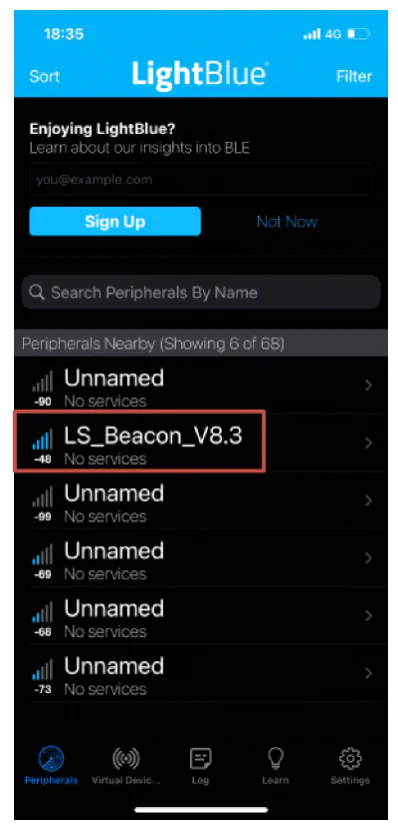
Etapa 3: Abrir Azul claro, and click a beacon with the name “LS_Beacon_V8.3” which will show up in the app. Please click the iBeacon within 1 minute after powering on, or it must be restarted to enter the configuration mode again.
Configuração principal #


- Click “Major” (step 1).
- Click “Write new value” (step 2).
- Enter a new value (step 3) and click “Done” (step 4) to save and click “0xFFF2” (step 5) to return to the “Major” page.
- The new value is shown in the value block (step 6) of the “Major” page, and the previous value is grey. Click the “LS_Beacon_V8.3” (step 7) to return to the previous page.
- Click “Back” (step 8) to exit the configuration. Otherwise, the change will NOT be saved.
Configure “UUID”, “Minor”, “Interval”, “TX_power”, “G-sensor thld”, and “Advert time” in the same way. Please exit LightBlue after configuration. The light stops flashing after configuration.
Configuração do anúncio do nível da bateria #


- Click “Battery Level Advert” (step 1).
- Click “Write new value” (step 2).
- Enter value “00” means disable the battery level advertising function, and “01” means enable this function (step 3). Click “Done” (step 4) to save and click “0xFFF8” (step 5) to return to the “Battery Level Advert” page.
- The new value is shown in the value block (step 6) of the “Battery Level Advert” page, and the previous value is grey.
- Click the ” LS_Beacon_V8.3″ (step 7) to return to the previous page. Then exit the configuration. Otherwise, the change will NOT be saved.
Configure “No Movement 24h Advert” in the same way. Please exit LightBlue after configuration. The light stops flashing after configuration.
We can also preprogram the “UUID”, “Major”, “Minor”, “Interval”, “TX_power”, “G-sensor thld”, “Advert time”, “Battery Level Advert”, and “No Movement 24h Advert” for you and print it on housing before shipment.
Battery Life of i5 Wearable Bluetooth Beacon #
Table 9: Battery Life (with the Acceleration Sensor)
| Intervalo de transmissão (ms) | 100 | 500 | 1000 | 5000 |
| Corrente média (μA) | 154 | 33.8 | 17 | 5 |
| Duração da bateria (meses) | 1 | 7 | 13 | 47 |
Table 10: Battery Life (without the Acceleration Sensor)
| Intervalo de transmissão (ms) | 100 | 500 | 1000 | 5000 |
| Corrente média (μA) | 153 | 33 | 16 | 4.2 |
| Duração da bateria (meses) | 1 | 7 | 14 | 57 |
Note:
Em relação à precisão, diversos fatores influenciam a exatidão das medições de distância com BLE. RSSI.
- Shadow effect: signals can be reflected by walls and glasses around many times during the transmission. Diffraction changes the signal path This results in receiving unstable signal strength.
- Existem muitos dispositivos conectados às redes 2.4G, Wi-Fi, Bluetooth e Zigbee. Os sinais podem se sobrepor, tornando a intensidade do sinal recebido instável.
- Devido às limitações na fabricação de semicondutores, Potência TX Não é estável.
Ao usar um beacon para posicionamento, considere o seguinte método para medir a distância.
- Enquanto o farol estiver anunciando, experimente repetidamente o RSSI a uma distância de 1 metro por um mínimo de 10 segundos.
- Descartar os 10% mais altos. RSSI amostras.
- Descarte os 20% mais baixos. RSSI amostras.
- Calcule a média das amostras restantes para obter o valor de Potência Medida.
Recomendamos outros dois algoritmos para calcular a distância e a posição:
- Algoritmo de média móvel, documento Lansitec número 930-00171.
- Calibração de posição, documento Lansitec número 930-00172.
Installation #


Option1: Wear it as a wristband.

Option2: Attach it to a key chain or a clip.
Como substituir as baterias #

Embalagem #
Embalagem em lote


Embalagem de amostra

Informações para encomenda #
| Descrição | PN |
| BLE Beacon, BLE 5.0, 32.6x9mm, Silicon gel bracelet, IP67, 230mAh | 100-000i5 |


 English
 ไทย
 한국어
 Français
 Deutsch
 日本語
 العربية
 Italiano
 Español de Chile
 Português (AO90)