
General Introduction #
The B010 beacon advertises BLE packets at a fixed interval and is connectable and configurable, offering a
long service life.
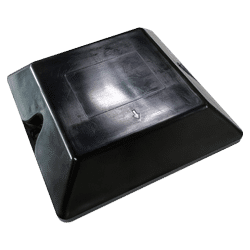
Product Specifications #
Table 1: Product Specifications
| Protocol | iBeacon |
|---|---|
| Tx Power | 0dBm in default, -20 to +4dBm TX power, configurable in a 4 dBm step |
| Range | Up to 100m |
| Density for indoor tracking | >10m |
| Broadcasting | Minimum 100ms |
| Accelerometer | Optional |
| Power consumption | 16μA @ 1s interval and 0dBm TX power |
| Battery | 2xCR2477, 2000mAh |
| Weight | 150g |
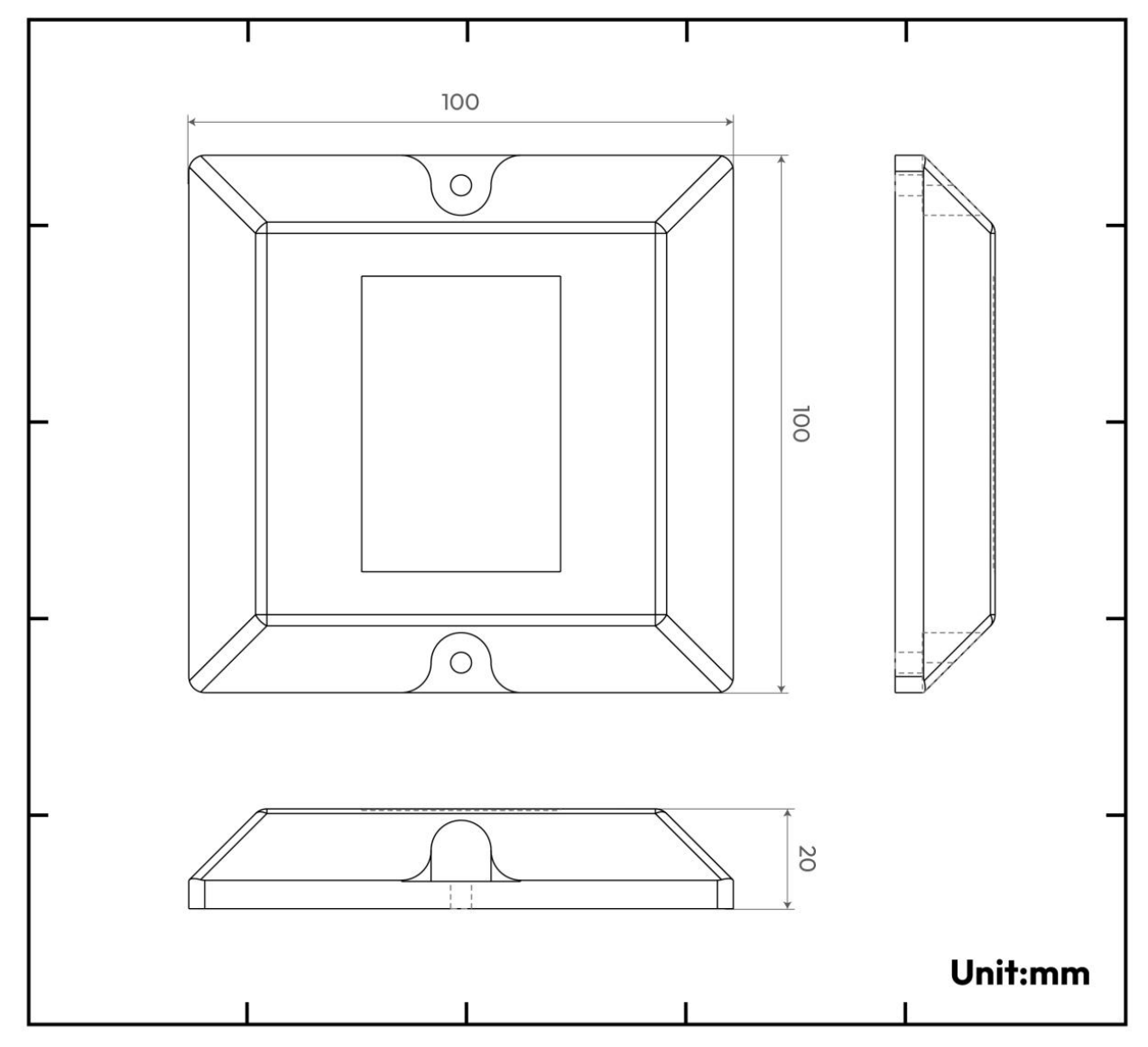
| Dimension | 100mm*100mm*20mm |
| Certification | FCCID: 2APPL-100-0B, CE |
Function Description #
TX Power #
The signal strength sent by the beacon. The default value 06 (0dBm)
Table 2: TX Power
| Value Type | Value | TX Power (dBm) |
|---|---|---|
| Hex | 01 | -20 |
| 02 | -16 | |
| 03 | -12 | |
| 04 | -8 | |
| 05 | -4 | |
| 06 | 0 | |
| 07 | 4 |
Advertise Interval #
The interval of beacon advertisement is 1sin default, this means that the beacon advertises the advertising packet once every 5s. The maximum Advertisement interval is 10s.
Table 3: Advertise Interval
| Value Type | Value | Interval (ms) |
|---|---|---|
| Hex | 01000000 | 100 |
| 02000000 | 200 | |
| 03000000 | 300 | |
| 04000000 | 400 | |
| 05000000 | 500 | |
| …… | …… | |
| 64000000 | 10,000 |
Advertising Feature #
The beacon advertises a standard advertising packet when the battery level feature is not enabled.
Table 4. Standard iBeacon Advertising Packet
| Byte Offset | Default Value | Description | Properties |
|---|---|---|---|
| 0 | 0x02 | Data length – 2 bytes | Constant Preamble |
| 1 | 0x01 | Data type – flags | Constant Preamble |
| 2 | 0x06 | LE and BR/EDR flag | Constant preamble |
| 3 | 0x1A | Data length – 26 bytes | Constant preamble |
| 4 | 0xFF | Data type – Manufacturer specific data | Constant preamble |
| 5 | 0x4C | Manufacturer data | Constant preamble |
| 6 | 0x00 | Manufacturer data | Constant preamble |
| 7 | 0x02 | Manufacturer data | Constant preamble |
| 8 | 0x15 | Manufacturer data | Constant preamble |
| 9 | 0xF2 | Proximity UUID 1st byte | User UUID |
| 10 | 0xA5 | Proximity UUID 2nd byte | User UUID |
| 11 | 0x2D | Proximity UUID 3rd byte | User UUID |
| 12 | 0x43 | Proximity UUID 4th byte | User UUID |
| 13 | 0xE0 | Proximity UUID 5th byte | User UUID |
| 14 | 0xAB | Proximity UUID 6th byte | User UUID |
| 15 | 0x48 | Proximity UUID 7th byte | User UUID |
| 16 | 0x9C | Proximity UUID 8th byte | User UUID |
| 17 | 0xB6 | Proximity UUID 9th byte | User UUID |
| 18 | 0x4C | Proximity UUID 10th byte | User UUID |
| 19 | 0x4A | Proximity UUID 11th byte | User UUID |
| 20 | 0x83 | Proximity UUID 12th byte | User UUID |
| 21 | 0x00 | Proximity UUID 13th byte | User UUID |
| 22 | 0x14 | Proximity UUID 14th byte | User UUID |
| 23 | 0x67 | Proximity UUID 15th byte | User UUID |
| 24 | 0x20 | Proximity UUID 16th byte | User UUID |
| 25 | AA | Major 1st byte | Major value |
| 26 | BB | Major 2nd byte | Major value |
| 27 | CC | Minor 1st byte | Minor value |
| 28 | CC | Minor 2nd byte | Minor value |
| 29 | 0xB3 | Signal power (Calibrated SSI@1m) | Signal power value |
Configuring Lansitec BLE Beacon with an iPhone #
Notice: all parameters are in hexadecimal coding.
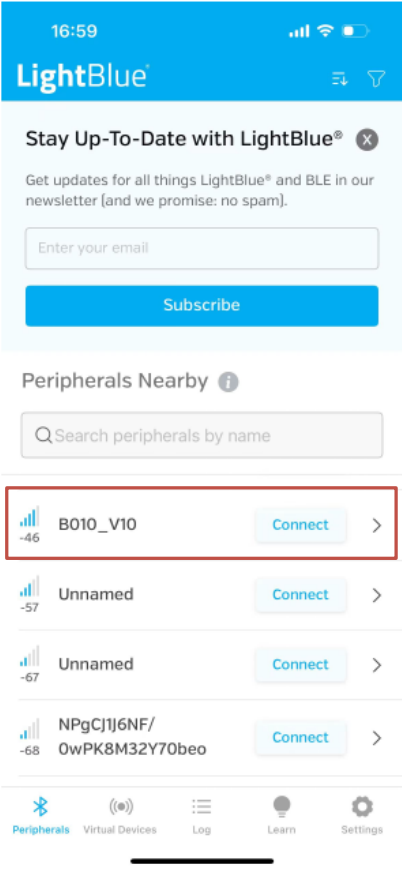
Step 1: Search and download “LightBlue” in the App Store.

Step 2: The B010 beacon automatically turns on upon connecting to a power source.
Step 3: Open LightBlue and click a beacon with the name “B010_V10” which will show up in the app. An
enter password is required when connecting this beacon, otherwise you can only view the configuration
and cannot modify it.
Major Configuration #
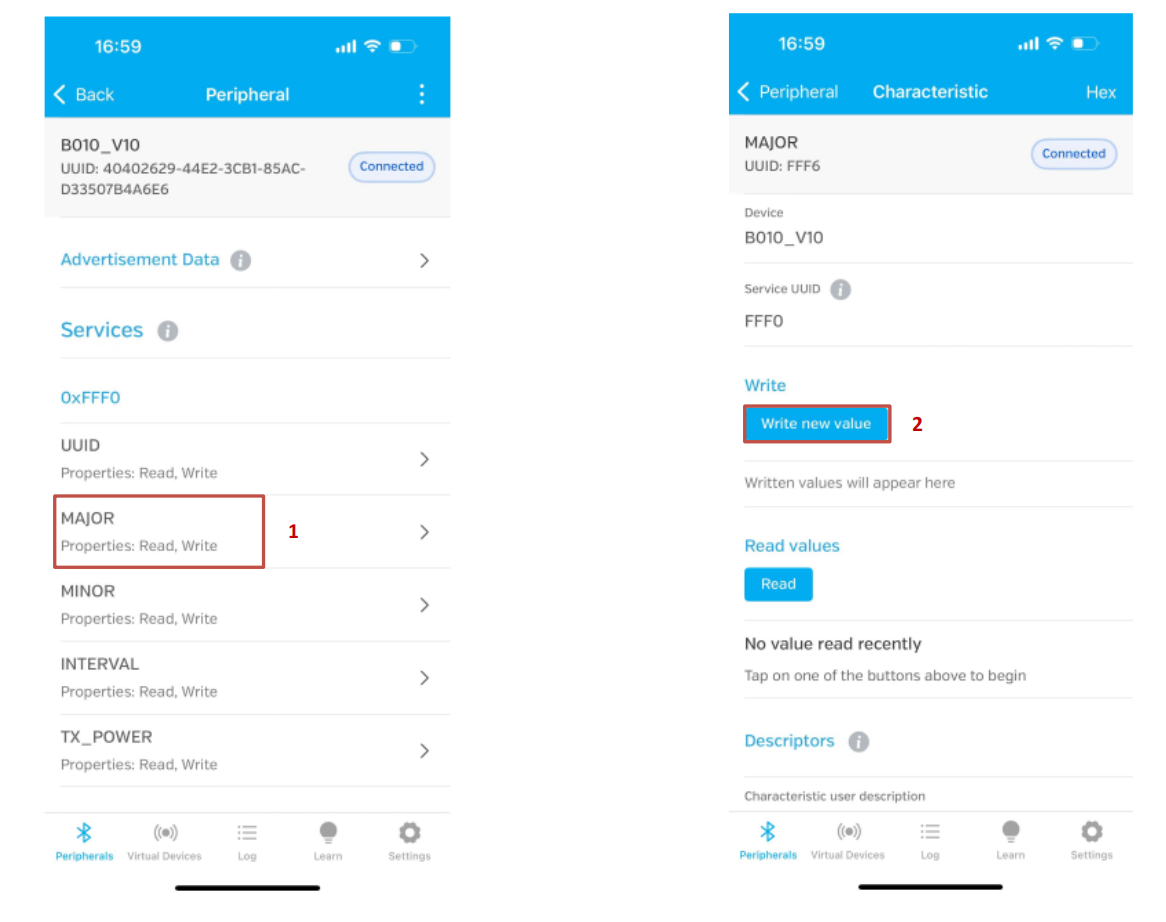
- Click “Major” (step 1).
- Click “Write new value” (step 2).
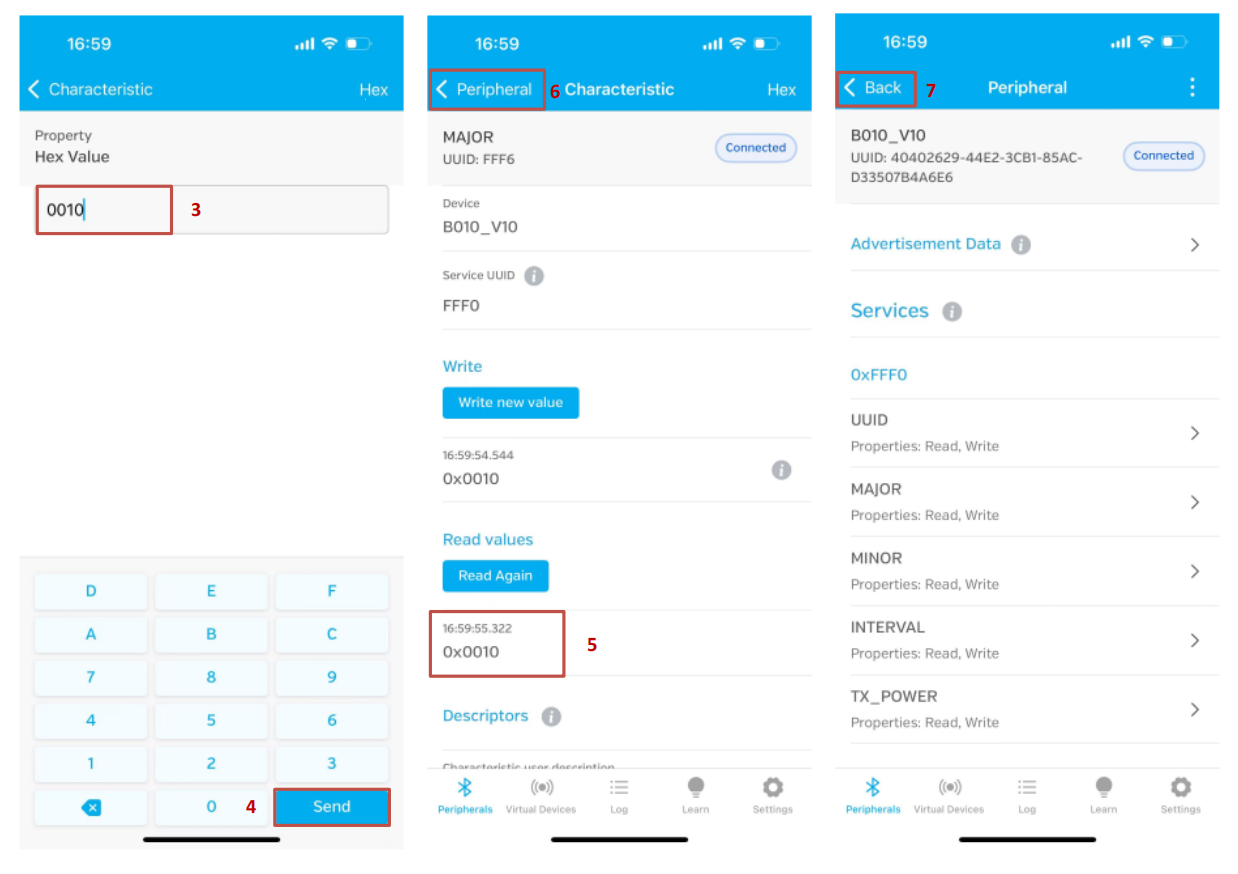
- Enter a new value (step 3) and click “Send” (step 4) to save.
- The new value is shown in the value block (step 5). Click the “Peripheral” (step 6) to return to the previous page.
- Click “Back” (step 7) to exit the configuration. Otherwise, the change will NOT be saved.
Configure “UUID”, “Minor”, “Interval”, and “TX_power” in the same way. Please exit LightBlue after configuration. The light stops flashing after configuration.
Battery Life #
Table 5: Battery Life
| Broadcast Interval (ms) | 100 | 500 | 1000 | 5000 |
|---|---|---|---|---|
| Average Current (µA) | 153 | 33 | 16 | 4.2 |
| Battery Life (Year) | 1 | 5 | 9.7 | Over 10 |
Note:
Regarding accuracy, several factors influence the accuracy of distance measurements with BLE RSSI.
- Shadow effect: Signals can be reflected by walls and glasses many times during transmission.
- Diffraction changes the signal path, Which results in receiving unstable signal strength.
- There are many devices on 2.4G, Wi-Fi, Bluetooth, and Zigbee. The signal may overlap, making the
- received signal strength unstable.
- Due to the semiconductor manufacturing limitation, TX power is not stable.
When using a beacon for positioning, please consider the following method for measuring the distance.
- While the beacon is advertising, repeatedly sample the RSSI at a 1-meter distance for a minimum
- of 10 seconds.
- Discard the highest 10% of the RSSI samples.
- Discard the lowest 20% of the RSSI samples.
- Average the remaining samples to obtain the Measured Power value.
We recommend another two algorithms for calculating the distance and position:
- Moving average algorithm, Lansitec document number 930-00171.
- Position Calibration, Lansitec document number 930-00172.
How to Install a Beacon #
Packaging #
Batch packaging #
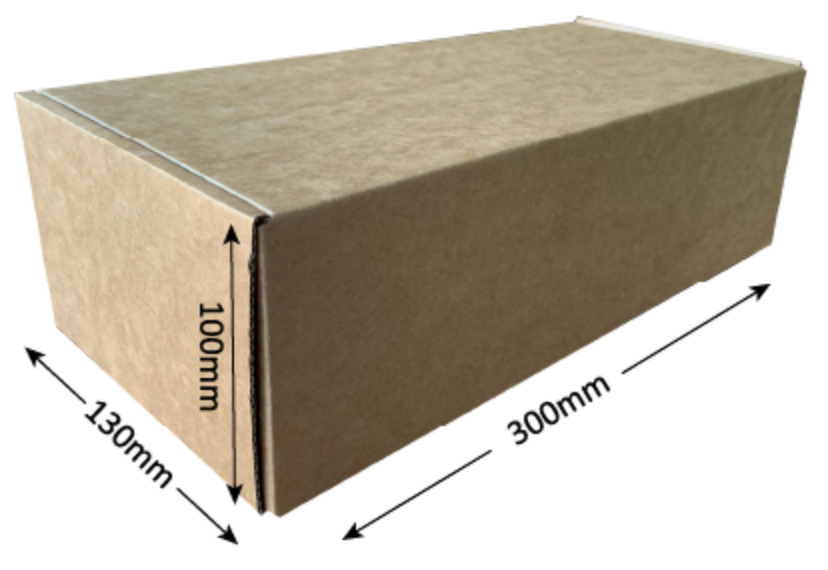
Sample packaging #

Ordering Information #
| Description | PN |
|---|---|
| Industrial Beacon, BLE 5.0, 100*100*20mm, 2xAA battery (: 2xER14250) | 100-0B010 |


 English
  ไทย
ไทย  한국어
한국어  Français
  Deutsch
  Español
  日本語
日本語  العربية
  Italiano
  Português